

Open the Discord Invite
On a phone, that button opens the Discord app when you have it.
Use the Invite Code
tRvjRHRTpaIn Discord, press the plus button at the bottom of your server list, choose Join a Server, and paste the code.
On a Computer? Scan With Your Phone
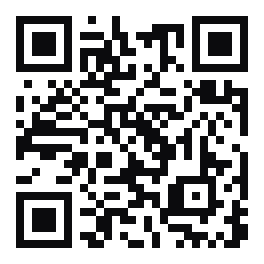
Your camera opens the invite in the Discord app.
No Discord Yet
Discord is free. Create an account at discord.com and verify your email address, then come back and use the code above.
If It Still Does Not Work
- Opened this from Facebook, Messenger, or Instagram? Tap the menu and choose Open in Browser, or copy the code and paste it in the Discord app.
- Your Discord account needs a verified email address before it can join a server.
- Discord caps accounts at 100 servers. Leave one you no longer use and try again.
- If Discord shows you our rules first, accept them and the channels appear.
- Still stuck? Send an application on the Join page with your Discord username, and an officer will reach out and invite you.